
Workflow permissions#
Adding groups and users#
First of all, login to the CMS as an administrator. Ensure you have "Authors", "Editors" and "Managers" groups created with a single user linked to each group (in the standard "Security" admin). Assign the six "Advanced Workflow" permissions to each group.
Workflow permissions#
This section describes the different permission that can be assigned to a user, group or role.
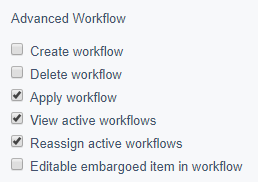
Create workflow#
A user with this permission can create and change workflow definitions.
Delete workflow#
A user with this permission can delete:
- workflow definitions
- workflow instances
That means, if a user needs to completely stop and delete an active workflow, they would need this permission.
Apply workflow#
A user with this permission can choose which workflow should be used for an item. For instance, for a page this permission will allow the user to change the workflow in a drop down under the Page > Settings > Workflow tab.
View active workflows#
A user with this permission can view active workflows via the workflows admin panel.
Reassign active workflows#
A user with this permission can reassign active workflows to different users and groups.
Editable embargoed item in workflow#
A user with this permission can edit items that have been embargoed by a workflow.